Calendar & booking
Edit recurring schedules or move one appointment
Understand occurrence edits, series changes and drag-to-reschedule confirmation.
For owners1 min read
One occurrence versus the series
Clicking a group class opens that date’s occurrence, including its roster. Use Edit the Recurring Schedule when you intend to change the series. An occurrence-only change must not be assumed to update later classes.
Move an appointment
- Drag the calendar appointment to the intended time slot.
- Read the confirmation showing the proposed date and time.
- Review any conflicts or time-off warnings.
- Accept to save, or cancel to retain the original schedule.
- Reopen the occurrence to confirm its final date, time and instructor.
Bulk recurring changes
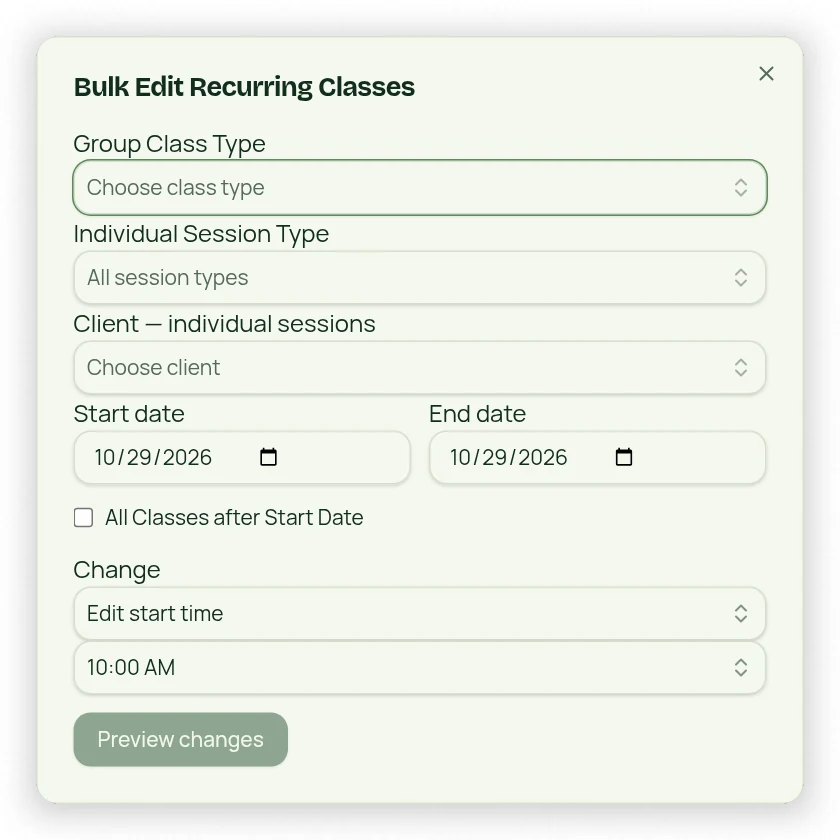
Bulk Edit Recurring Classes below Calendar lets you select type/client and date range, change applicable types/times or delete selected future occurrences. All Classes after Start Date extends the scope beyond a fixed end date. Review the scope carefully: series rules affect future expansion, not just appointments currently visible on the calendar.