Memberships & packages
Create a Package Type and understand session credits
Separate a purchasable bundle from appointment length and booked capacity.
For owners1 min read
What a package contains
A Package Type defines a reusable bundle with its price, allowance and applicable expiry/discount choices. A purchased package belongs to one client and keeps its purchase terms. Appointment minutes come from the Session Type or Class Type, not the package.
Create the bundle
- Open Settings → Package Types and choose the creation button.
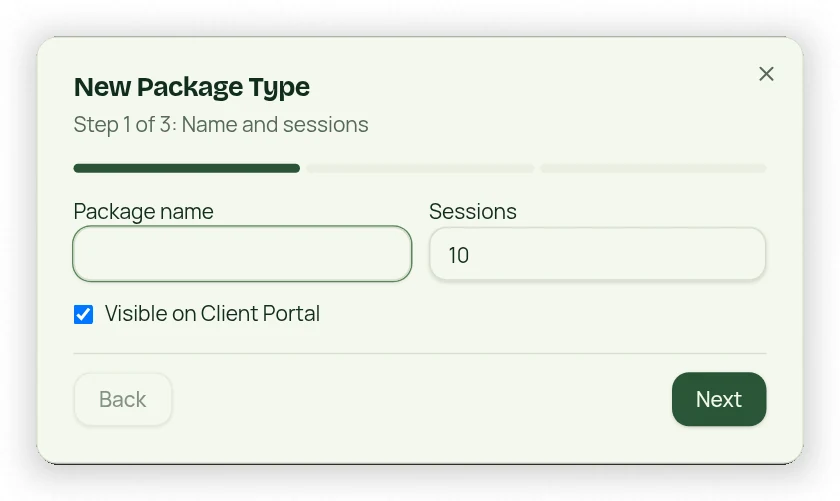
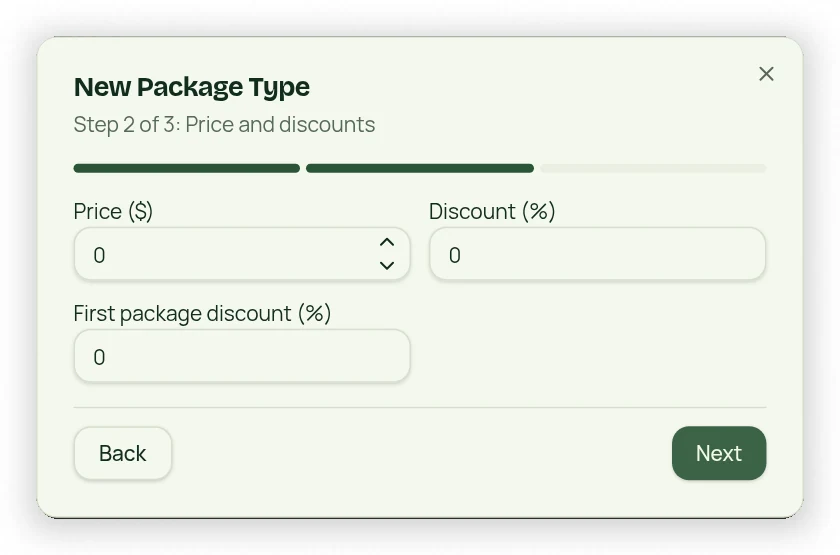
- Enter a unique name, price and choose Session Credits or Class Credits with an allowance.
- Set optional expiration, discount and recurring-charge choices where offered.
- Review portal visibility and any applicable eligibility settings.
- Review the three-step workflow and save.
Understand available credits
Each session uses one Session Credit and each class uses one Class Credit. Credits must match the selected appointment type. Scheduled bookings reserve capacity so credits cannot be spent twice. Attendance uses the saved cost. Expired or unpaid purchases are not eligible booking entitlement; reward packages may also provide usable credits under their terms.