Memberships & packages
Create a Membership Type
Define a reusable recurring offer before signing up individual members.
For owners1 min read
A type is not an enrollment
A Membership Type is the reusable offer. A client enrollment stores the selected terms, start and billing choices, agreement and verification. Editing the catalog does not rewrite a previously signed enrollment.
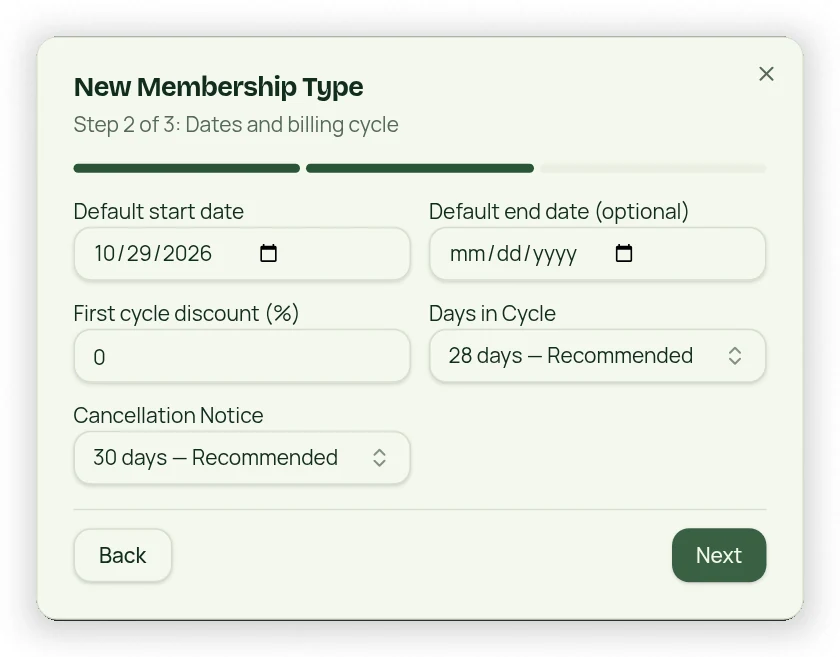
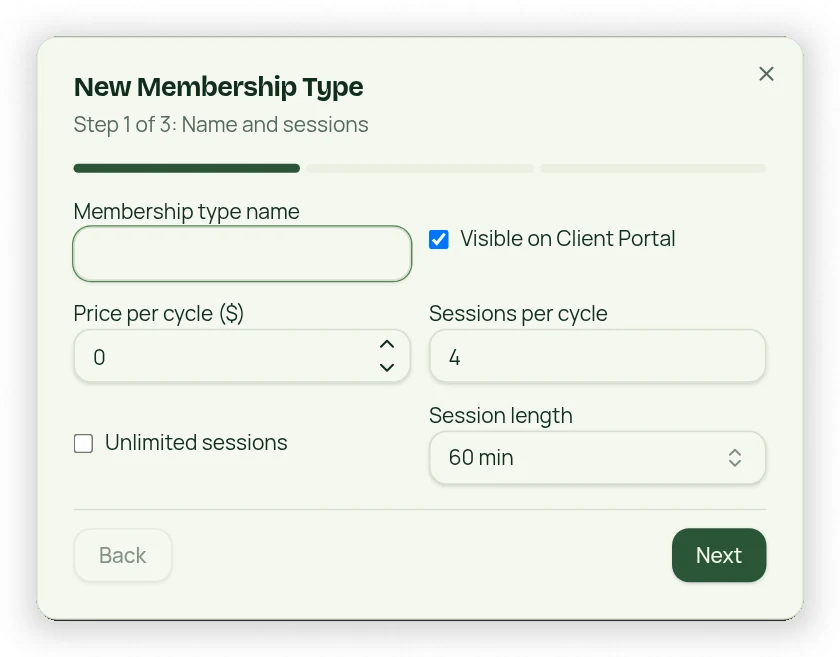
Use the three-step setup
- Open Settings → Membership Types and use the creation button.
- Enter a unique active name, price, Session Credit or Class Credit allowance or unlimited option, and available discount choices.
- Set Days in Cycle and cancellation notice. Options include day-based, weekly and monthly cycles.
- Review agreement and waiver defaults and complete the required owner acknowledgment.
- Review the final step and save; choose whether the offer is visible on the client portal.
Review legal and billing details
The 28-day recommended cycle is not the same as a calendar month. Review the actual cycle, charge date and notice shown in the signup flow. Agreements and liability-waiver defaults need business-specific and legal review before use. Recurring card collection also needs a ready payment account and verified customer consent.